
PerksPe Webapp Workflow

This page provides an overview of the complete onboarding journey in PerksPe. From registering your organization to assigning perks and managing employee expenses, the workflow guides you through every major step required to get started.

Before You Begin

The workflow is divided into six major stages. Understanding these stages first will make the flowchart much easier to follow.


1
Corporate RegistrationThe organization registers with PerksPe by submitting its business details. After verification, Transcorp completes the company's KYC and an invite code is generated.
2
Create Employer AccountUsing the invite code received after company verification, the employer creates the organization account and signs in to the PerksPe portal.
3
Employee KYCEmployees complete their MinKYC using the PerksPe mobile app. They can later complete Video KYC (VKYC) for higher wallet limits and additional features.
4
Organization SetupConfigure the organization by creating roles, registering perks, adding employees, assigning roles, and assigning perks.
5
Daily OperationsAfter onboarding, administrators can manage employees, process expenses, reimburse employees, manage perks, and monitor day-to-day activities.
6
Reports & MonitoringGenerate reports and monitor employee benefits, expenses, and reimbursements for auditing and accounting purposes.

The following diagram illustrates the complete onboarding and operational flow of PerksPe.
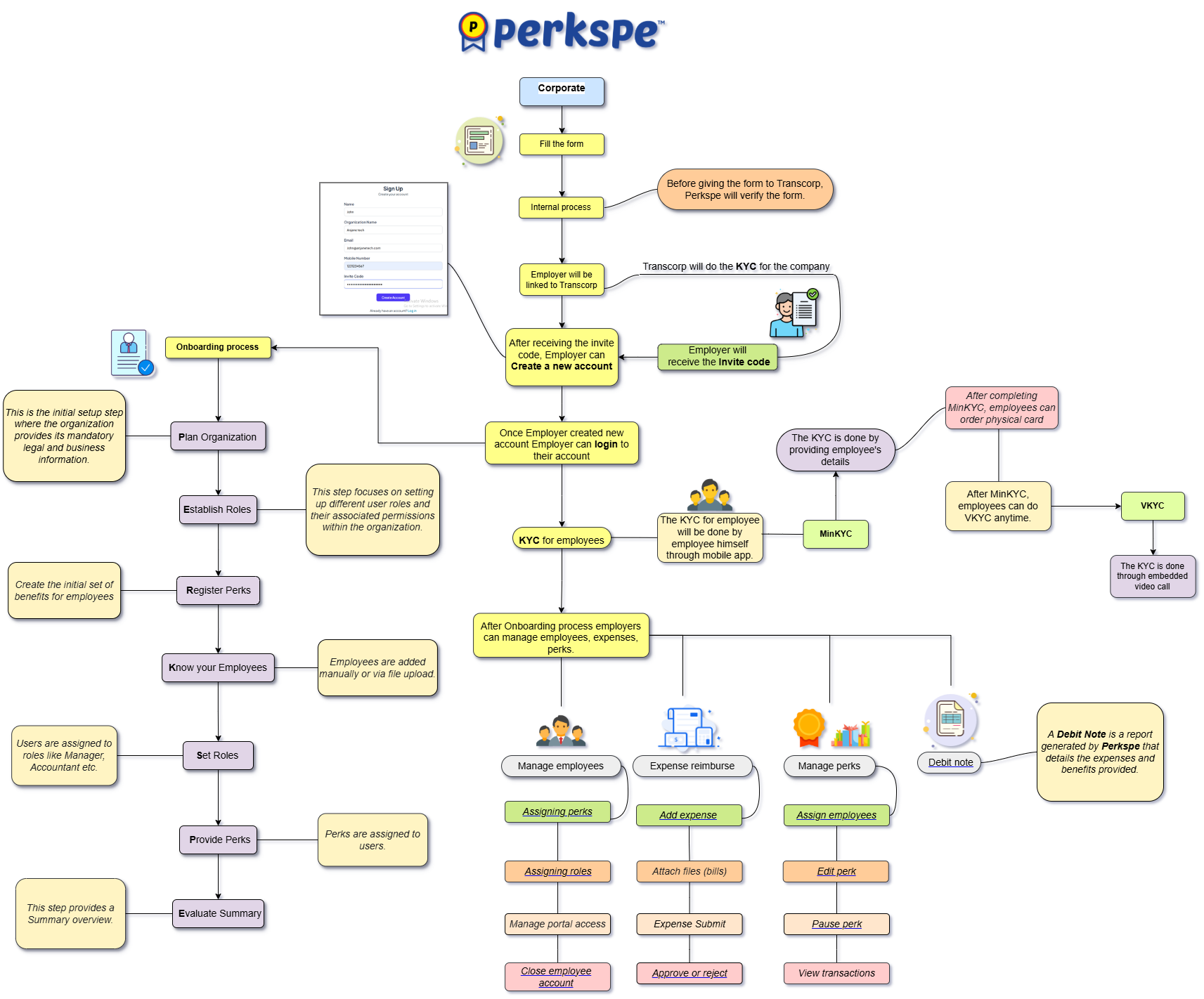
Diagram


🏢

Company Verification

Every organization is verified before receiving an invite code to access PerksPe.

🪪

Employee KYC

Employees complete MinKYC and can later upgrade to Video KYC for higher wallet limits.

🎁

Perk Management

Create perks, assign them to employees, and manage their lifecycle from a single portal.

💸

Expense Management

Employees submit expenses while managers and finance teams review, approve, reimburse, and track them.

📄

Reporting

Generate reports to simplify accounting, auditing, and compliance.